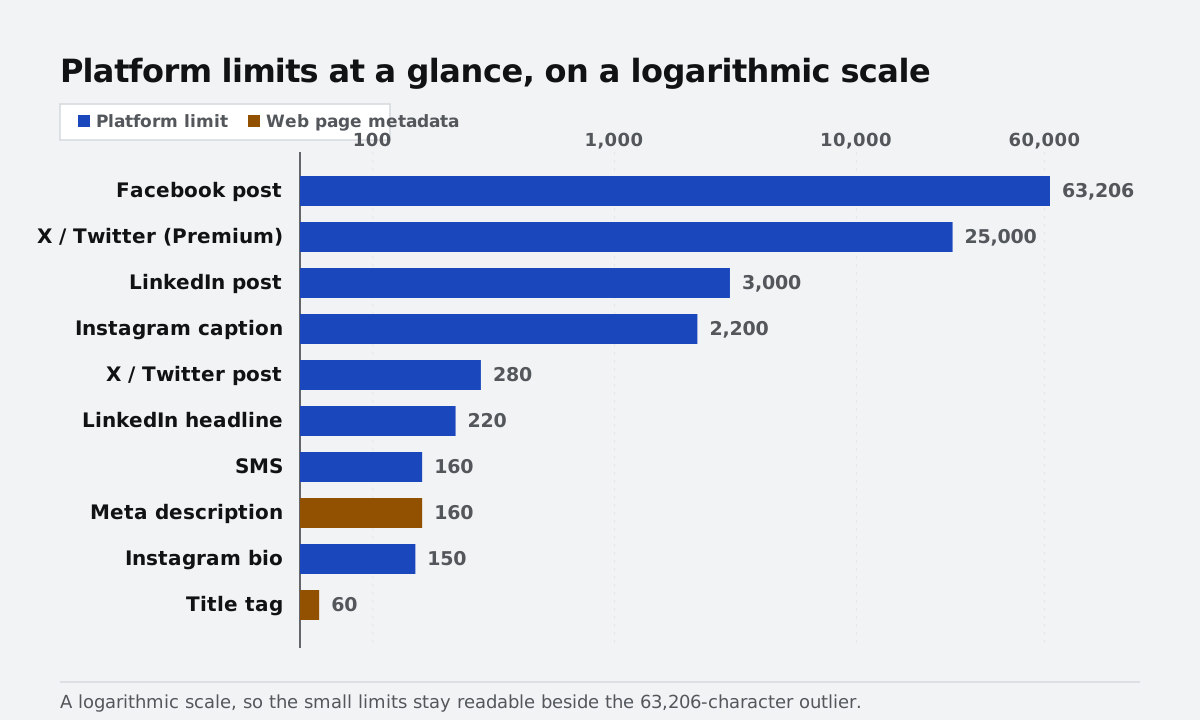
Character limits are easy to forget until a post gets cut off or a caption refuses to publish. The table below collects the limits that come up most often, and the word and character counter shows your text against all of them live as you type — nothing is uploaded, so drafts stay private.
Platform character limits at a glance
| Where | Limit | Notes |
|---|---|---|
| X / Twitter post | 280 | Emoji and most non-Latin characters count as 2 |
| X / Twitter (Premium) | 25,000 | Long-form posts |
| Instagram caption | 2,200 | Only the first ~125 characters show before "more" |
| Instagram bio | 150 | Counts emoji as characters |
| LinkedIn post | 3,000 | Around 210 characters show before truncation |
| LinkedIn headline | 220 | Profile headline field |
| Facebook post | 63,206 | Truncates at roughly 477 characters in feed |
| SMS | 160 | 70 for non-Latin scripts; longer texts split into parts |
| Meta description | ~160 | Google truncates past roughly 920 pixels |
| Title tag | ~60 | Shorter is safer on mobile |
Why a character is not always one character
Most of these limits are counted in UTF-16 code units, which is a technical way of saying that an emoji is usually two "characters" rather than one. A flag or a family emoji made from several joined symbols can count as even more. Plain letters, digits, and punctuation count as one each. If you are close to a limit and your text is full of emoji, cut a few more than the counter suggests.
Editing to fit without losing the point
When you are over the limit, the fastest wins are usually cutting filler phrases ("just wanted to", "in order to"), removing doubled adjectives, and moving detail into the first comment or the linked page. If you are repurposing the same text across platforms, the case converter can adjust the case style to fit each one — sentence case for LinkedIn, title case for a newsletter heading — without retyping.
Counting without uploading your draft
The character counter tracks words, characters with and without spaces, sentences, paragraphs, and reading time, and shows progress bars against the X, SMS, Instagram, and meta-description limits as you type. Because it runs entirely in your browser, it is safe for unpublished drafts, client copy, and anything else you would rather not paste into an online tool that stores it.